
Snapseed
Google LLCPhotography
4.821.10K Reviews
- Version
- Varies With Device
- Installs
- 100.00M
- Age Rating
- Everyone
Screenshots
Our Review of Snapseed
 Analysis by Appyee
My favorite way to use a mobile photo editor is to fix what distracted me when I took the picture, then stop before the edit becomes more noticeable than the moment. That is where Snapseed makes sense to me: it gives me hands-on control over a single image without asking me to build a complicated editing routine around it. Made by Google LLC, it is a free photography app for Android and iOS, rated for Everyone. Its average is 3.7 from around 1.7 million ratings, and it has passed 100 million installs. Those figures suggest a broad audience, though they do not tell you whether its particular editing style will suit you.
A practical starting routine
When I open a photo, I first decide what is actually wrong with it: perhaps the subject is too dark, the sky pulls too much attention, or a distracting mark needs cleaning up. I make a restrained overall adjustment before reaching for a specialized tool. That order matters. If I add dramatic effects first, I can end up polishing a look that does not solve the original problem.
For a quick everyday edit, I would start with Tune Image, make small changes, and compare the result with the untouched photo. Then I would use Details only if the image genuinely needs more crispness. On a phone screen, sharpening can look impressive at first but make hair, leaves, and building edges harsh. I zoom in to check those areas, then zoom back out to judge whether the picture still feels natural.
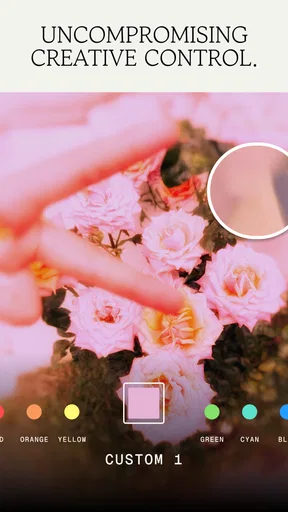
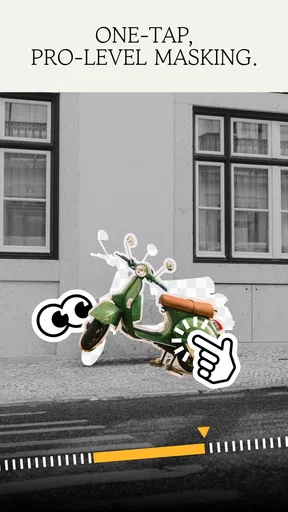
Selective edits are useful when the whole frame does not need the same treatment. For example, I might lift a face in shade without brightening a pale sky at the same time. The trade-off is that local adjustments reward patience: a subtle correction usually blends in better than a strong one. I treat the tool as a way to guide attention, not as permission to make every corner of a photograph equally vivid.
Small settings and habits that save time
A helpful habit is to keep the original photo in mind as a reference and check the edited version before saving. That simple pause catches edits that have drifted too far, especially when I have adjusted contrast, saturation, and a filter in one sitting. I also try to finish one image before opening another. It is easier to notice whether a choice works when I am not juggling several half-edited photos.
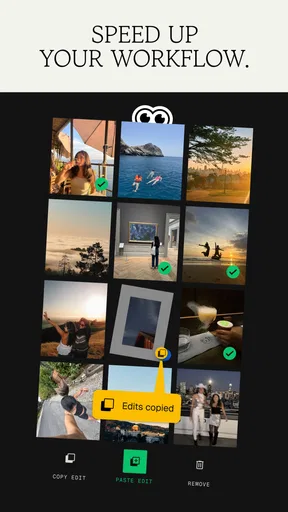
For a consistent look across a small set of pictures, I use the same visual priorities rather than blindly repeating every adjustment. A bright outdoor portrait and a dim indoor snapshot may need different exposure changes even if I want them to feel related. I might keep the color treatment restrained across both, while correcting each image separately. This is more reliable than assuming one recipe will suit every lighting condition.
Before sharing, I check the saved result in the place I expect people to see it: at normal phone size, not just enlarged in the editor. That helps me spot overdone texture or a crop that feels awkward in a feed. I also prefer saving a copy when I want to preserve a clean original for later. Overwriting can be convenient, but keeping an untouched version gives me more room to change my mind.
How the editing experience holds up
Have you ever found yourself scrolling through your phone’s gallery, wishing you could tweak that one photo to make it just perfect? Well, let me introduce you to Snapseed. This nifty little app has become my go-to tool for all things photo editing, and trust me, once you dive into it, you'll see why.
Getting Started with Snapseed
First things first, downloading Snapseed is a breeze. It’s available on both Android and iOS, so you're covered no matter what device you’re using. Once installed, you're greeted with a clean and intuitive interface. None of that overwhelming clutter you find in some editing apps! It’s like walking into an art studio where everything is neatly organized and ready for you to create.
Tools and Features Galore
Now, onto the fun part—the tools. Snapseed sports a whopping 29 tools and filters, and they’re all at your fingertips. From basic adjustments like brightness and contrast to more advanced tools like curves and healing, there’s something for every level of photographer.
- Tune Image: This is your bread and butter for editing. Adjust brightness, contrast, saturation, and more with simple swipes.
- Details: Enhance the details in your photo without making it look over-processed.
- Healing: Got a pesky blemish or an unwanted object in your shot? The healing tool is surprisingly effective at removing them.
- Selective: This feature lets you make precise edits to specific parts of your image. Perfect for when you want to highlight a particular subject.
But wait, there’s more! The app also offers some cool artistic filters like Drama and Vintage, which can completely transform your photos with a single tap. And for those of you who love a good black-and-white shot, the Black & White filter gives you complete control over the tones and grain.
Working with RAW
For the more serious photographers out there, Snapseed supports RAW files. This is a huge plus because you can make non-destructive edits to your high-quality images directly from your phone. It’s almost like having a mini Lightroom in your pocket!
Saving and Sharing
Once you’ve perfected your masterpiece, saving and sharing it is a cinch. Snapseed allows you to save a copy or overwrite the existing image. Plus, sharing your creations on social media is straightforward, so you can show off your skills to all your followers.
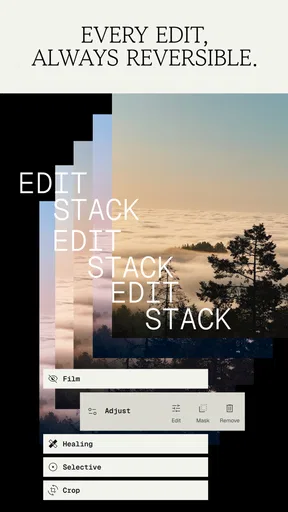
One thing that really stands out is the non-destructive editing feature. This means you can always go back and tweak your adjustments without starting from scratch. It’s like having an undo button that never quits!
The Learning Curve
If you're new to photo editing, don’t fret. Snapseed is user-friendly, and the learning curve isn’t steep at all. There are plenty of tutorials and guides available online if you ever get stuck, but honestly, a bit of experimenting goes a long way.
For those who are already pros, the app offers enough depth and control to keep you engaged. It’s versatile enough to satisfy both newbies and seasoned photographers.
Where it fits, and where it does not
In my experience, the strongest reason to choose this editor is the balance between direct controls and a manageable workflow. Compared with a basic gallery editor, it gives me more room to shape tone, remove a small distraction, and work on selected areas. Compared with a desktop-oriented editor, it is easier to pick up for a single phone photo, but it is not where I would want to manage a large professional archive or build a carefully coordinated batch workflow.
A realistic example is a quick photo from a family lunch: the people look good, but the window behind them is bright and a crumb on the table catches the eye. I would make a modest overall tonal adjustment, use a selective correction on the subject if needed, and try Healing on the small distraction. Then I would inspect the result at ordinary viewing size. If the removal leaves an obvious smudge, I would rather crop slightly or keep the imperfection than spend too long forcing a clean repair.
That last choice points to an important limit. Healing works best on small, relatively simple distractions; it is not a dependable substitute for detailed retouching when an object overlaps a complicated edge or patterned background. The same restraint applies to filters. Drama and Vintage can be fun when the picture calls for a strong mood, but they can overwhelm skin tones or make a casual snapshot feel artificial. I use them as a starting point, not an automatic improvement.
When another kind of editor is a better fit
I would recommend Snapseed to someone who wants to edit individual photos carefully, learn what common adjustments do, and avoid paying for a basic correction workflow. It is also a good fit for people who enjoy experimenting: the range from simple brightness changes to curves, selective work, and black-and-white controls gives a beginner room to grow without making every edit depend on a preset.
I would look elsewhere if my main goal were applying one branded look to a steady stream of posts with minimal thought, organizing a large image library, or retouching a portrait with very precise, complex cleanup. A social-focused editor may make templates and quick presentation effects easier, while a more specialized desktop or mobile workflow may be better for extensive catalog management and repeatable production. Snapseed is strongest when I am willing to make decisions photo by photo.
RAW support is valuable if I already have a suitable file and want more latitude than a compressed image provides, but it does not turn a phone into a full desktop studio. I still need to judge the image on its own merits, make controlled adjustments, and check the exported result. For a quick post, a normal image file is often simpler; for a photograph I care about refining, RAW can make the extra editing attention worthwhile.
Making the most of its control
One useful way to learn is to change a single tool at a time and compare before moving on. If I alter tone, detail, and a filter together, it becomes difficult to tell which decision helped and which caused the image to feel too processed. I also use a deliberate stopping point: once the subject reads clearly and the distracting issue is less noticeable, I pause rather than searching for another effect to add.
The app’s non-destructive approach makes experimentation less intimidating, but I would not treat that as a reason to skip careful saving. I keep an untouched original when I may want to revisit the photo, and I save a finished copy when I want a version ready to share. That habit answers a practical question many new users have: yes, you can preserve room to change your mind, but it is still wise to know which version is your original and which one is your edit.
Another common question is whether a beginner needs to understand curves or RAW before getting value from the app. I do not think so. Basic adjustments and a light selective correction can already solve many everyday problems. I would explore the advanced tools only when I can name what I want to fix; otherwise, the extra control can make editing slower without making the picture better.
Final Thoughts
Overall, Snapseed is a powerhouse of an app wrapped up in a simple, elegant package. Whether you’re looking to make quick adjustments or delve into more detailed edits, it’s got you covered. Plus, it’s completely free! No ads, no hidden costs—just pure editing bliss.
If you haven’t tried Snapseed yet, do yourself a favor and give it a shot. It’s like having a professional photo studio right in your pocket, ready to help you create stunning images anytime, anywhere. Happy editing!
Privacy and Permissions
See what permissions an app requests and how it handles your data.
- Location
- approximate location (network-based), precise location (GPS and network-based)
- Photos/Media/Files
- read the contents of your USB storage, modify or delete the contents of your USB storage
- Storage
- read the contents of your USB storage, modify or delete the contents of your USB storage
- Camera
- take pictures and videos
- Other
- view network connections, full network access, set wallpaper, draw over other apps, read Google service configuration
Verdict
Strengths of Snapseed
- Intuitive interface for quick editing.
- Wide range of professional-grade tools.
- Non-destructive editing preserves originals.
- Supports RAW file editing.
- Free with no in-app purchases or ads.
Limitations of Snapseed
- Steep learning curve for beginners.
- Limited filter variety compared to others.
- No direct sharing to social media.
- Occasional lag on older devices.
- Lacks cloud storage integration.
Other Releases by Google LLC
View All
Google Calendar
Productivity4.6

Google Messages
Communication4.6

Tools4.0

Google TV
Video Players & Editors3.9
Similar Picks in This Category
View All
Google Photos
Google LLC4.4

Gallery
Google LLC4.2

Picsart AI Photo Editor, Video
PicsArt, Inc.3.9

B612 AI Photo&Video Editor
SNOW Corporation4.1

BeautyPlus-Selfie Photo Editor
PIXOCIAL TECHNOLOGY (SINGAPORE) PTE. LTD.4.5

Remini - AI Photo Enhancer
Bending Spoons4.1
Frequently Asked Questions
What features does Snapseed offer for photo editing?
Snapseed provides a robust suite of editing tools that include fine-tuning options like brightness, contrast, and saturation. It also offers advanced features such as selective adjustments, healing for removing unwanted parts of an image, and a variety of filters to enhance your photos artistically. Additionally, the app supports RAW file editing, making it a powerful tool for both amateur and professional photographers.
Is Snapseed user-friendly for beginners?
Yes, Snapseed is designed to be intuitive and user-friendly. It offers a clean interface with easy-to-navigate tools, which makes it accessible for beginners. The app includes tutorials and tips to help new users understand its functionalities. However, its extensive features also cater to more advanced users looking for detailed editing capabilities.
Can I use Snapseed on both Android and iOS devices?
Absolutely, Snapseed is available for download on both Android and iOS platforms. This ensures that users across different devices can access its powerful editing tools. The app is regularly updated to maintain compatibility with the latest operating systems, ensuring smooth performance on both platforms.
Does Snapseed support sharing edited photos on social media?
Yes, Snapseed makes it easy to share your edited photos directly to social media platforms. Once you've completed your edits, you can export your image and choose from various sharing options, including social media apps like Instagram, Facebook, and Twitter, allowing you to showcase your creativity with a wider audience effortlessly.
Is Snapseed a free application?
Snapseed is completely free to download and use, with no hidden fees or subscription costs. This makes it an attractive option for users who are looking for a cost-effective yet powerful photo editing app. Despite being free, it offers professional-grade features that rival many paid applications in the market.
